
AI Governance Discovery Report
What an MSP's client receives after an AI governance review. Every finding and screenshot below is real output from a Microsoft 365 test tenant I set up and reviewed.
1. Executive summary
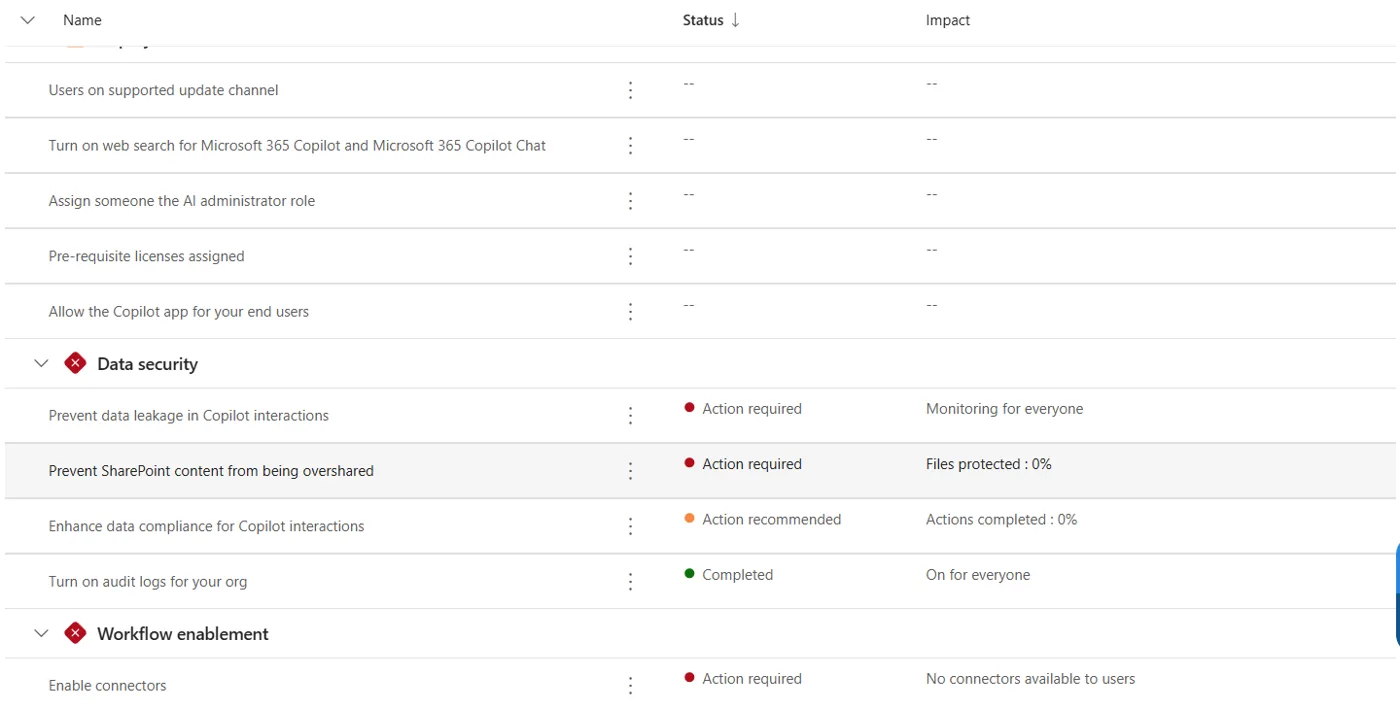
Overall rating: high risk, quick to improve. Staff connected five third-party apps to company accounts without IT involvement, including a meeting recorder. Copilot is switched on, and Microsoft's own readiness dashboard scores the tenant's Copilot data security at 25%. No user has multi-factor authentication registered yet. None of this needs new software to fix.
| # | Finding | Risk |
|---|---|---|
| F1 | Any user could connect any app to their company account | High |
| F2 | A meeting-recording AI tool was connected by a user without review | High |
| F3 | Copilot can surface any file a user can open; oversharing controls at 0% | High |
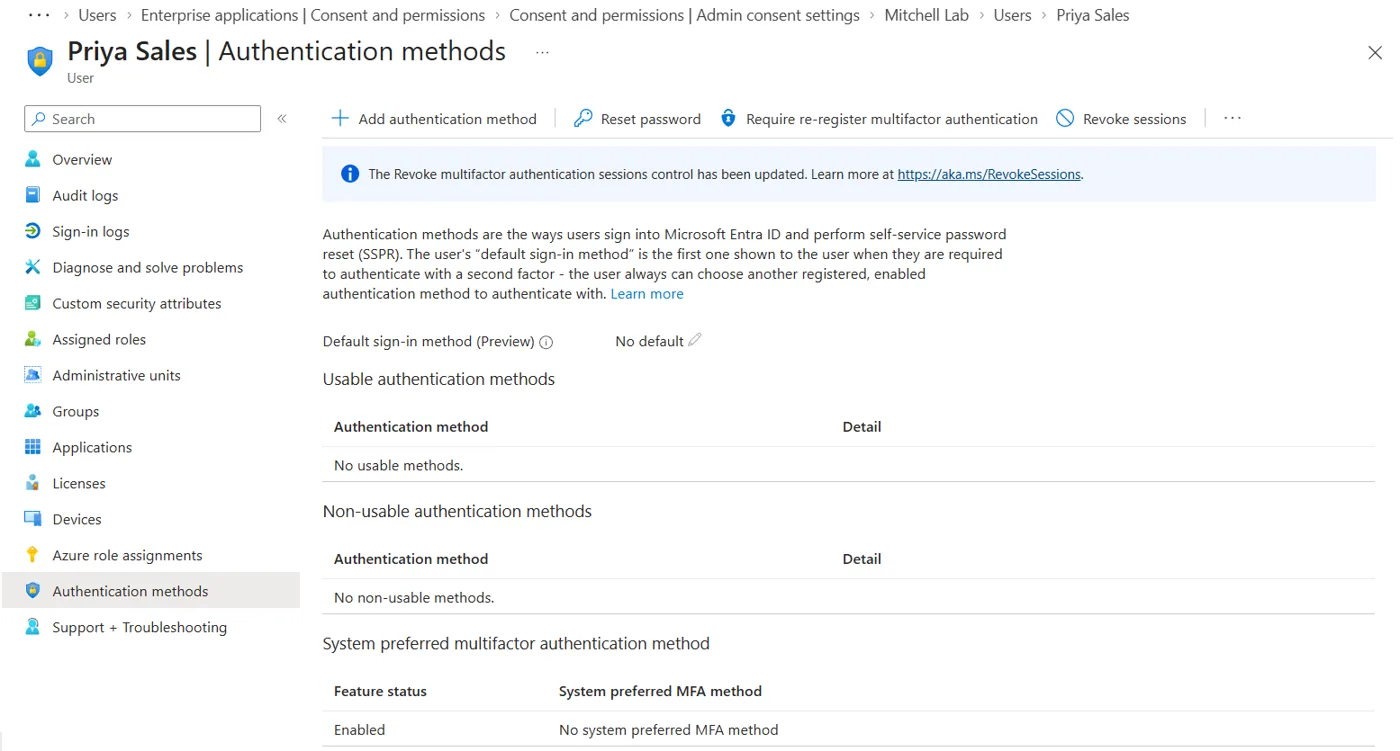
| F4 | No user has multi-factor authentication registered | High |
| F5 | Copilot uses an additional AI provider by default; nobody chose this | Medium |
| F6 | An approval that looked organisation-wide only covered one person | Medium |
| F7 | AI agent settings have never been decided | Medium |
| F8 | AI tools used with personal accounts cannot be seen from the admin console | Medium |
2. Scope and method
One Microsoft 365 Business Premium tenant with Copilot, three users, reviewed over two days in November 2026. Read-only admin views first, then fixes tested.
- Connected apps: every third-party app in Entra ID, its permissions, and who approved it
- Activity: sign-in logs and audit logs for each AI-related app
- Approval settings: whether users can connect apps alone, and whether requests reach IT
- Identity: security defaults and each user's MFA registration
- Copilot: admin settings, AI providers, agent settings and Microsoft's data security scorecard
A full client review also covers DNS or web-filter logs, expense records and an anonymous staff survey, which find AI tools used with personal accounts (F8).
3. AI tool register
Each tool is scored 1 to 3 on data sensitivity, access and autonomy. Totals of 7 to 9 are high, 5 to 6 medium, 3 to 4 low.
| Tool | What it does | Approved by | Score | Tier | Status after review |
|---|---|---|---|---|---|
| Microsoft 365 Copilot | AI assistant across mail, files and chats | Licensed by IT | 8 | High | Kept; data security controls needed |
| Otter | Records and transcribes meetings | One user, no review | 8 | High | Blocked; assignment required |
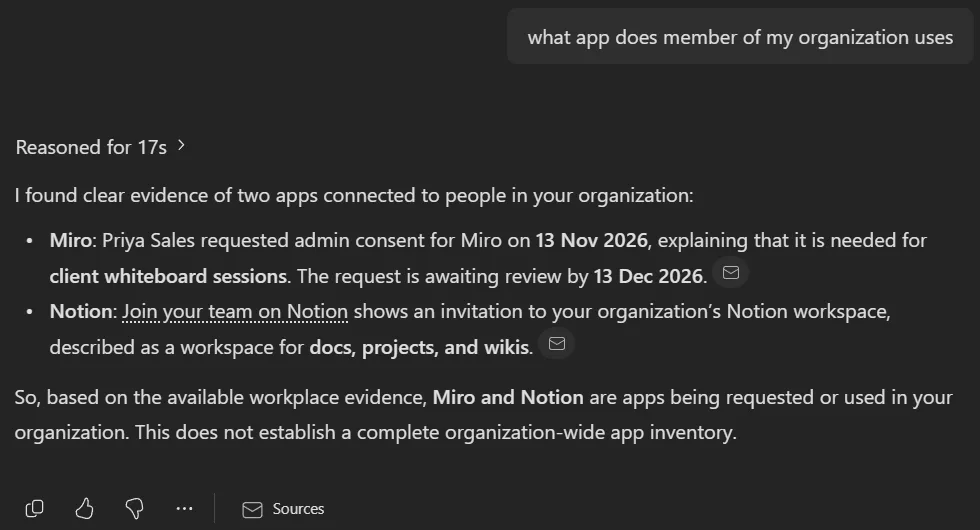
| Miro | Whiteboards with AI features | Admin, after a request | 5 | Medium | Approved for one user only |
| Notion | Docs and wiki with AI features | Admin | 5 | Medium | To review; signup offered AI training on workspace data |
| Zoom | Meetings with AI companion | Admin, for self only | 5 | Medium | To review |
| Canva | Design with AI features | One user, no review | 3 | Low | Approve and add to register |
4. Key findings
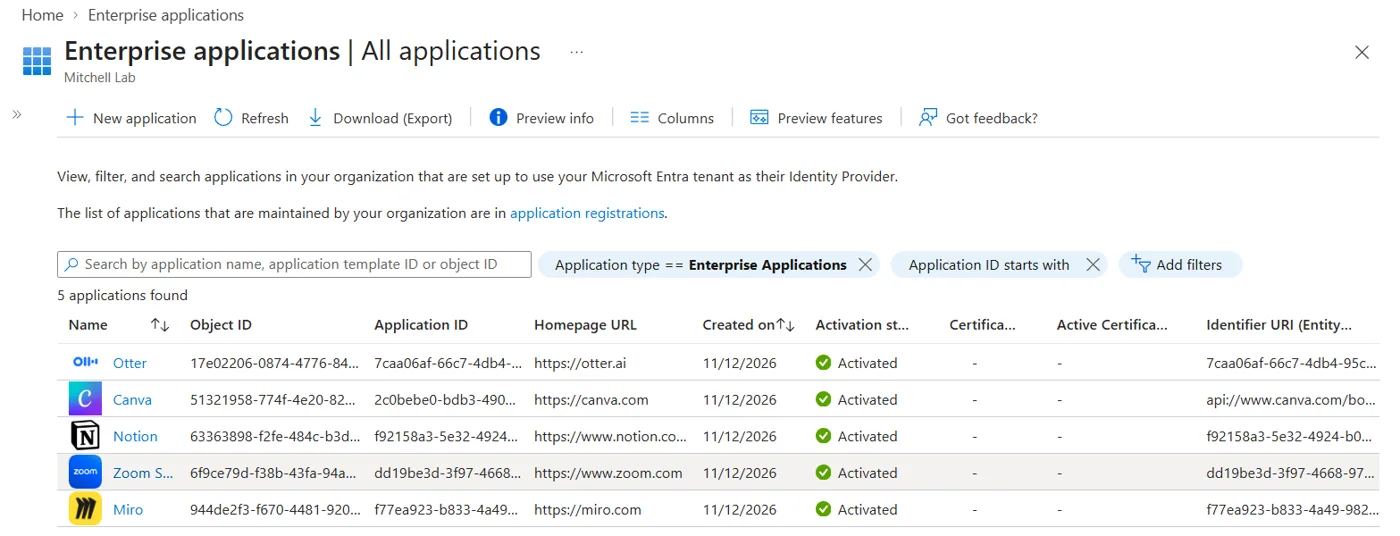
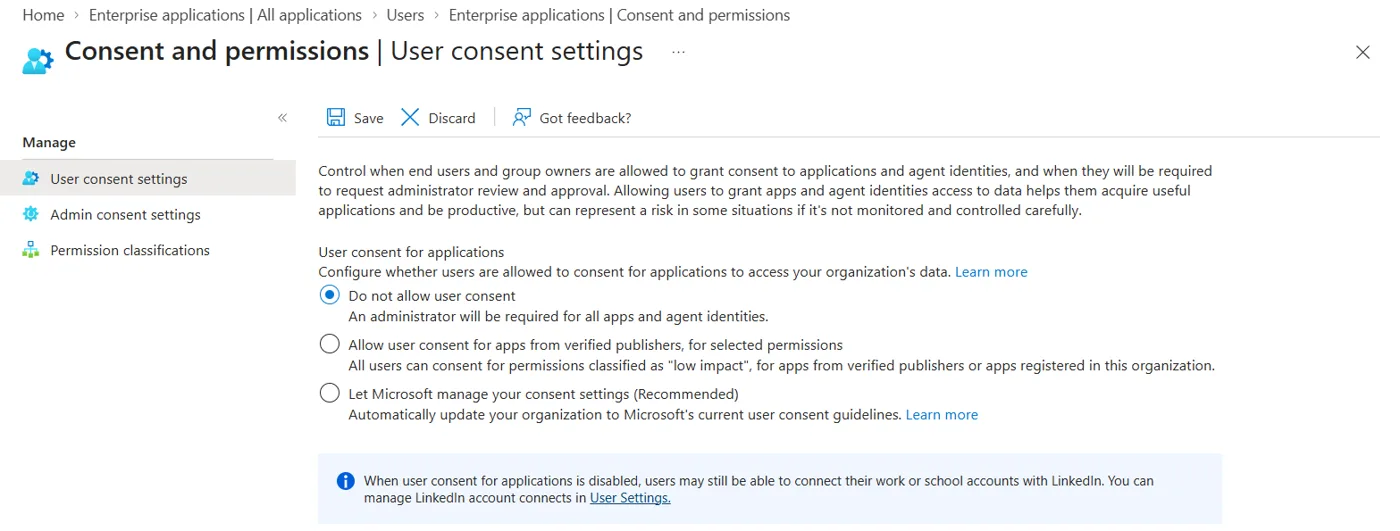
Any user could connect any app to their company account
HighSeen: User consent allowed all apps. A user connected Otter, Canva and Miro in minutes with no IT involvement.
Why it matters: Each app can read profile data and keep access while the user is away (offline access). IT had no list and no say.
Fix: Set user consent to "Do not allow" and turn on admin consent requests so staff can still ask. Done during the review.
A meeting-recording AI tool was connected without review
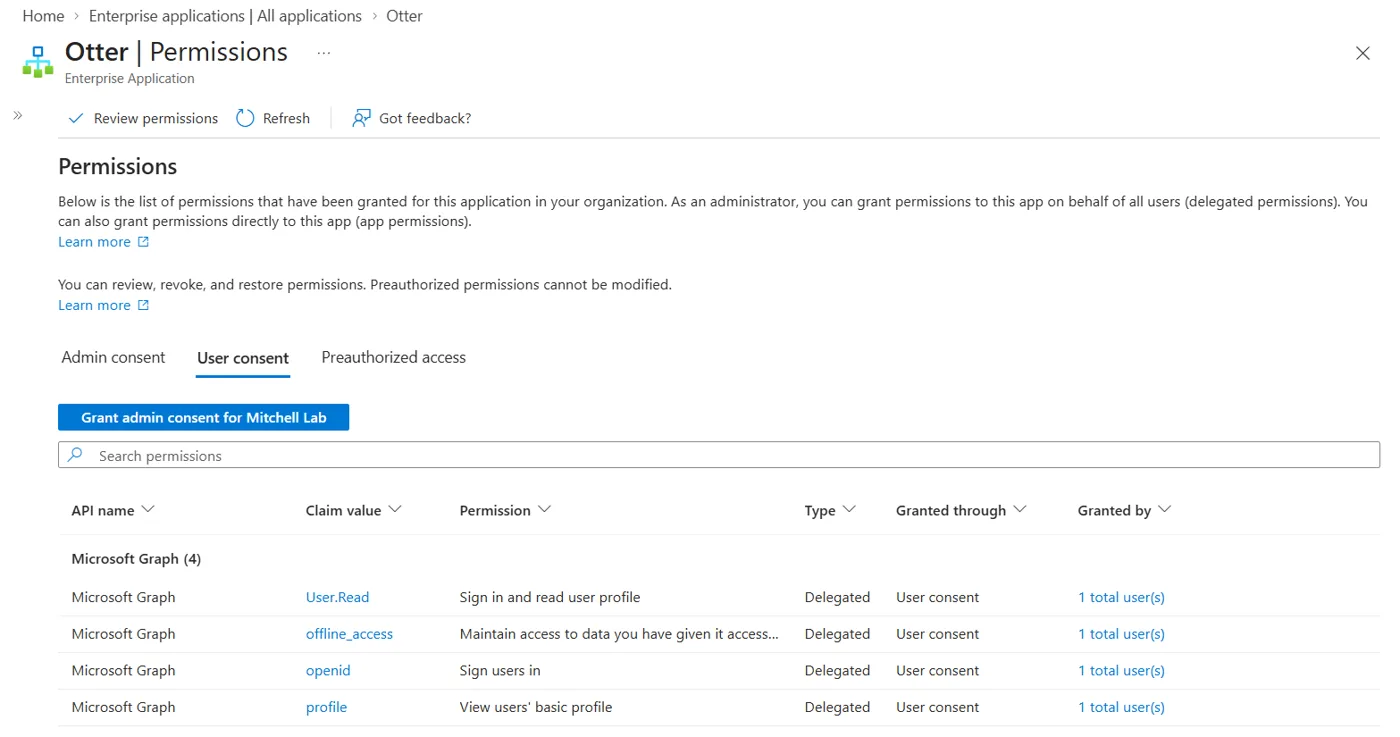
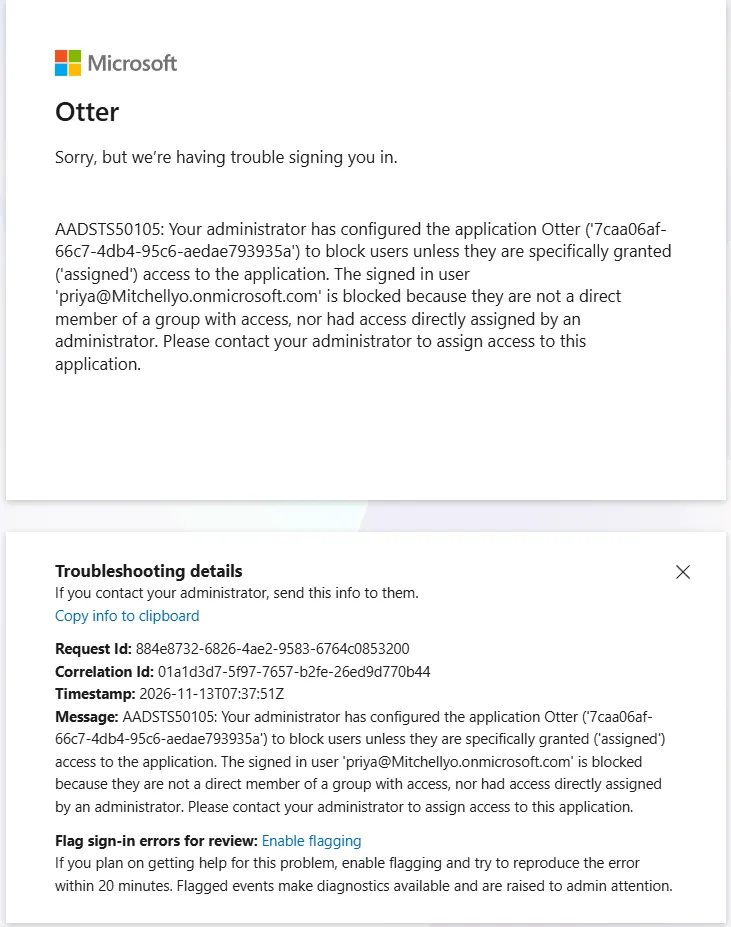
HighSeen: Otter was approved by one user. It named its workspace after the company domain and prompted the user to invite colleagues and connect their calendar so its bot could join meetings.
Why it matters: Client conversations can be recorded and stored with a third party, and tools like this spread through a company by email domain.
Fix: Require assignment (done), remove the user, revoke sessions and close the vendor workspace. Decide in the AI policy whether meeting recorders are allowed.
Copilot can surface any file a user can open
HighSeen: Microsoft's Copilot scorecard shows SharePoint oversharing protection at 0% and no data-loss rules for Copilot.
Why it matters: Copilot doesn't create new access; it makes existing oversharing instantly searchable. In testing it answered from a security alert in the admin's mailbox and gave an out-of-date status.
Fix: Review sharing on sensitive sites, apply sensitivity labels, and turn on data-loss rules for Copilot before wider rollout.
No user has multi-factor authentication registered
HighSeen: Security defaults are on, but users get 14 days to register. Every sign-in was single-factor and test users had no methods registered.
Why it matters: Anyone with a password reaches every app that user has connected, AI tools included.
Fix: Require registration now and check the registration report weekly until every user is done.
Copilot uses an additional AI provider by default
MediumSeen: "Allow Anthropic as Microsoft subprocessor" is on for everyone. Nobody in the organisation chose this.
Why it matters: Client contracts or data-location promises may need to name every processor of client data.
Fix: Confirm with leadership, record the decision, and check the separate independent-processor setting stays off.
An approval that looked organisation-wide only covered one person
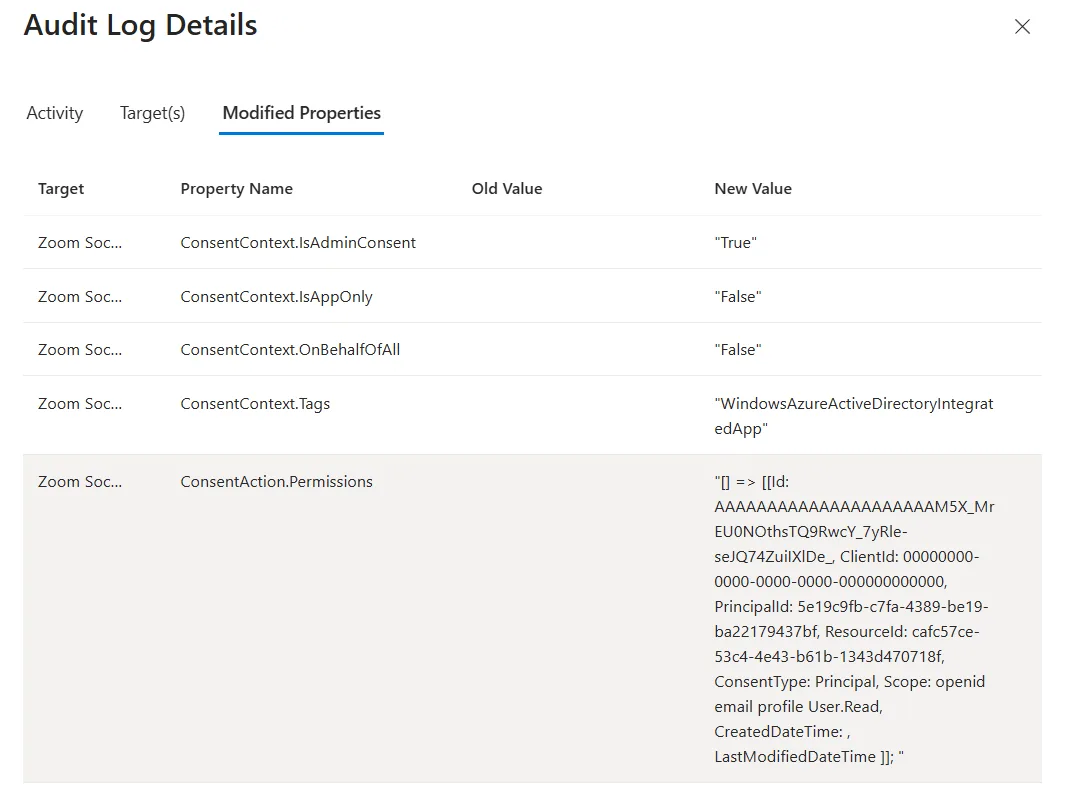
MediumSeen: An admin approved Zoom, but the audit log shows OnBehalfOfAll = False: it applied to the admin only.
Why it matters: IT believed the app was reviewed for everyone. Other users could still approve it themselves.
Fix: Record approvals in the register, check the audit log, and limit access with assignment.
AI agent settings have never been decided
MediumSeen: Who can build, upload and use agents is unset.
Why it matters: Agents act without a person each time. Fewer than half of security leaders can list every agent they run.
Fix: Decide who may build and share agents, then review the agent list monthly.
Personal-account AI tools cannot be seen here
MediumSeen: ChatGPT's Microsoft sign-in accepts personal accounts only, so its use never appears in the company's logs.
Why it matters: The most common AI tools are often used with personal email, with company data pasted in.
Fix: Add DNS or web-filter logs, an expense check and an anonymous staff survey. Cover personal accounts in the AI policy.
5. Remediation plan
This week
- Stop user app consent; turn on admin consent requests (done)
- Require assignment for Otter and Miro (done)
- Force MFA registration for all users
- Remove the Otter user, revoke sessions, close the vendor workspace
- Send staff a one-page AI acceptable-use note
Within 30 days
- Approve the AI acceptable-use policy and the AI tool register
- Review Notion and Zoom: approve, limit or block
- Record the Copilot AI-provider decision
- Set who can build and share agents
- Run the DNS, expense and staff-survey checks
Within 90 days
- Fix SharePoint oversharing on sensitive sites and apply sensitivity labels
- Turn on data-loss rules for Copilot
- 30-minute staff AI-use session
- First quarterly AI governance report to leadership
6. Framework mapping
| Finding | ISO/IEC 42001 | NIST AI RMF | EU AI Act |
|---|---|---|---|
| F1, F6 App approval and register | AI system inventory; third parties | Govern; Map | Deployer duty to know AI in use |
| F2 Meeting recorder | AI impact assessment; data | Map; Measure | Transparency to people recorded |
| F3 Copilot data exposure | Data management and protection | Manage | Data governance |
| F4 MFA | Supporting security controls | Manage | General security expectations |
| F5 AI providers | Supplier relationships | Govern | Due diligence on providers |
| F7 Agents | Roles, responsibilities, oversight | Govern; Manage | Human oversight |
| F8 Personal-account AI | AI policy; awareness | Govern | AI literacy (Article 4) |
Mapping is indicative for planning, not a certification opinion.
7. Ongoing governance
| How often | What gets checked | Output |
|---|---|---|
| Monthly | New apps and consent requests, sign-ins to AI apps, new agents, MFA registration | Updated register and change note |
| Quarterly | Vendor AI changes in approved tools, risk scores, Copilot scorecard, access reviews | One-page dashboard for leadership |
| Yearly | Policy refresh, framework mapping, full rediscovery | Updated report like this one |
Want this for one of your clients?
Book a 20-minute call: cal.com/mitchellswapnil/intro
Email: mitchell@mitchellswapnil.com · Web: mitchellswapnil.com